
Fix accessibility issues faster with smarter prioritization and automation.
ShiftView helps you focus on the fixes that matter most, automate what’s safe to automate, and guide your team through everything else.
ShiftView Workflow
Prioritize the issues that deliver the biggest accessibility gains.
ShiftView guides you through fixing accessibility issues step by step—prioritizing what matters most, showing where issues appear, providing clear fix guidance, and validating changes with targeted re-scans.
1. Prioritize fixed by user impact
Understand which pages and components are affected by each issue group, making it clear how one fix can improve accessibility across your site.
Easily find & fix all occurrences of each issue
Issues are grouped and ranked by their potential impact on your accessibility score, so you can focus immediately on the changes that deliver the biggest gains.
Re-scan only affected pages
After applying a fix, re-scan just the impacted pages to confirm improvements quickly—without waiting on a full-site scan.

Prioritize fixes
Google Analytics-powered accessibility prioritization.
Connect Google Analytics to see which pages get the most traffic, then prioritize accessibility fixes where they’ll have the biggest impact. ShiftView combines traffic data with issue severity so you can focus on improving accessibility for the pages your users actually visit.
- Prioritize by visitor traffic
- Fix high-impact pages first
- See traffic data alongside issues
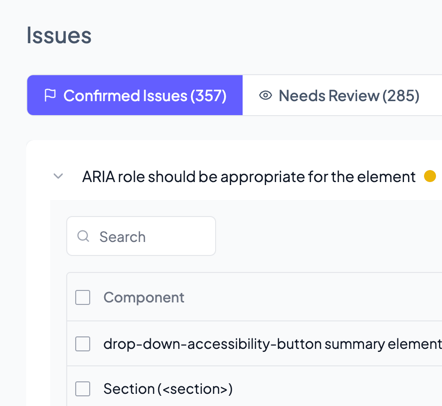
Issue scope
See every place an issue appears across your site.
Once an issue is identified, ShiftView shows you exactly where it occurs—across pages, templates, and components. This gives you a complete picture of how widespread each issue is, so you can fix it once with confidence instead of chasing it page by page.
- Intelligent issue grouping
- Page-level visibility
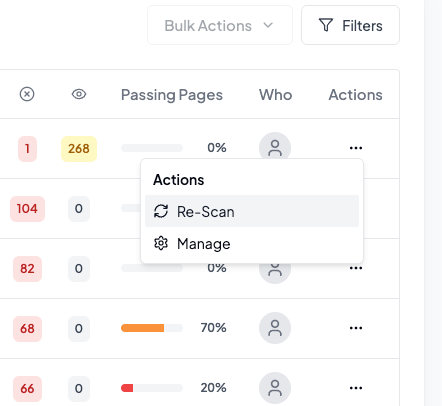
Validate fixes
Validate fixes quickly with targeted, flexible rescans.
After a fix is applied, ShiftView lets you re-scan only the affected pages to see how the change impacts your accessibility score. You get fast confirmation that your fix worked—without waiting on a full-site scan or reprocessing unchanged pages.
- Rescan by check type
- Rescan only pages affected by an issue
- Rescan single pages
Automated fixes
Tools to make an instant impact.
Some accessibility improvements can be applied right away. ShiftView includes built-in tools that help address specific, high-confidence issues immediately—while you continue working through deeper fixes using the guided workflow.
Accessibility widget
Give visitors optional controls to adjust contrast, text size, and other display preferences. The widget provides immediate usability support while longer-term accessibility fixes are implemented.
AI-generated, auto-applied alt text
ShiftView detects images without alt text and uses AI to generate descriptive alternatives automatically. Once enabled, these descriptions are applied on page load, helping screen readers access meaningful image context immediately—without requiring manual updates to your codebase.
Alt text can be reviewed and updated in the ShiftView app at any time, giving you control while still delivering instant accessibility improvements.
Fix FAQs
A site is a single domain or subdomain. For example, example.com and app.example.com are counted as separate sites.
It depends on your plan—our plans are designed to scale from those managing just one site to agencies handling dozens of client websites. Check our pricing page to compare limits and features, or contact us if you need a custom solution.
Getting started takes less than 2 minutes:
- Sign up and add your website URL
- Run your first scan (manual or scheduled)
- Review issues in the dashboard and start fixing them
- Optional: Install the accessibility widget on your site
- Optional: Connect Google Analytics to prioritize by traffic
No code changes required to start scanning—just add your URL and go.