
Find accessibility issues and validate fixes in seconds.
Automated WCAG scanning tests your entire site for violations in minutes. Schedule recurring scans, test desktop and mobile viewports, and get detailed reports with exact locations and fix guidance for every issue.
Powerful accessibility scanning to effortlessly test your entire site.
Built for websites of every size
Scan 3 pages or 2,000—ShiftView handles everything from landing pages to enterprise sites with the same speed and accuracy.
Check every screen size
Test desktop and mobile viewports simultaneously to catch responsive design issues and ensure accessibility across all devices.
Scheduled & on-demand scans
Run scans instantly when you need them or schedule automated weekly or monthly scans to catch issues as your site evolves.
Manage all of your websites
Monitor multiple client sites from one dashboard with separate settings, scans, and reports for each website.
Advanced scanning options
Scan behind login, exclude specific paths, choose WCAG versions, re-scan only specific checks/issues, and control page discovery settings.
Automated & simulated testing
Automated testing detects 90+ WCAG violations instantly. Simulated testing (experimental) lets you test keyboard navigation, focus order, and interactive elements.
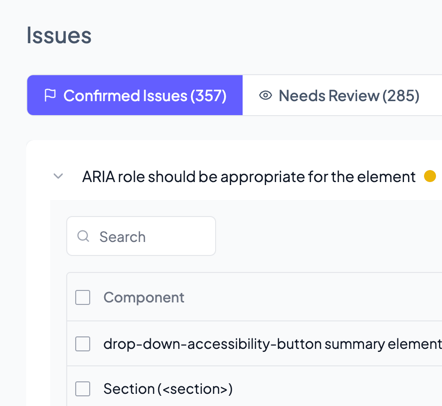
Clear, actionable insights into every accessibility issue.
Understand what’s broken and how to fix it. Every issue includes WCAG references, severity ratings, exact selectors, and remediation steps your developers can follow. Smart grouping identifies similar problems across pages, and targeted re-scans let you verify fixes immediately.
- View and filter issues by severity
- Intelligent issue grouping
- Spot pages with the most issues
- Re-scan pages instantly to verify fixes
- Connect Analytics to prioritize by impact
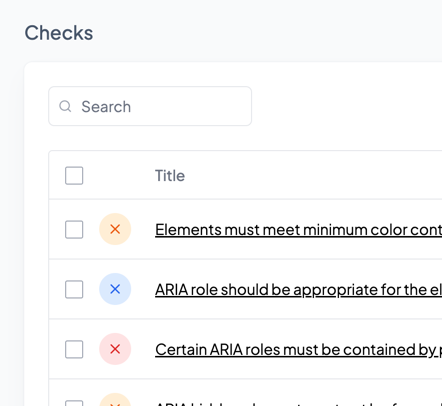
Reveal WCAG violations with clear, standards-based findings
ShiftView scans your site against WCAG 2.0, 2.1, and 2.2 guidelines—across A, AA, and AAA levels—so you can understand exactly which issues are blocking accessibility.
We highlight violations, explain why they matter, and help you prioritize fixes that meaningfully improve your site’s compliance posture. No guesswork, no jargon, just clear direction toward a more accessible experience.
- WCAG 2.0–2.2 coverage
- Issues mapped directly to WCAG criteria
- Clear explanations for every violation
- Track compliance progress over time
Scan FAQs
A page scan is the evaluation of a single URL for accessibility issues. Each page scanned counts toward your monthly page scan limit, whether the scan is run on demand or on a schedule.
Yes. You can scan client sites, prospect sites, or other third-party sites to run audits, scope work, or demonstrate accessibility issues during sales and discovery.
Yes. ShiftView supports scanning pages behind login and non-public environments, making it suitable for staging sites, client portals, and pre-launch audits.
One thing to note – once a site is created you can’t change the URL of that site. For example, if you’re scanning a staging environment for a site that hasn’t launched yet, once it launches you’ll need to create a new site (and consider deleting the staging site).
This is the maximum number of pages ShiftView will scan and analyze per website. You can set this yourself per site, up to the maximum number of pages per site allowed on your plan. It allows you to control crawl size and focus scans on specific sections of a site instead of scanning absolutely everything on the site. It gives you extra control over credit usage and how long it takes for scans to finish (it takes more time to scan 1,000 pages than it does 200).
Both, as long as your plan supports scheduled scans! You can run scans manually anytime from the dashboard, or set up automated schedules to scan your sites weekly or monthly.
Automated testing tools can only catch issues with clear, measurable rules—like missing form labels or insufficient color contrast. But accessibility isn’t just about technical compliance.
Many WCAG success criteria require human judgment: Is your content written clearly? Does your navigation make sense? Do interactive features work properly with keyboards and screen readers? These questions can’t be answered by code analysis alone. That’s true for every automated testing tool on the market, not just ShiftView.
ShiftView tests against WCAG 2.0, 2.1, and 2.2 at all conformance levels (A, AA, AAA). You can configure which version and level to test against per website. We also include best practice checks that go beyond minimum requirements. Most organizations target WCAG 2.1 Level AA as the standard for ADA compliance.